Boost Your Productivity with Stick ‘Em Up

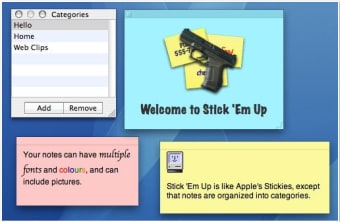
Stick ‘Em Up is a free productivity application designed specifically for Mac users. This app aims to enhance user efficiency by providing a simple and intuitive interface for managing tasks and notes. With its focus on organization, it allows users to easily create, edit, and prioritize tasks, ensuring that important items are always at the forefront of their workflow. The application is suitable for both personal and professional use, catering to a wide range of productivity needs.

In addition to its task management capabilities, Stick ‘Em Up offers features that facilitate quick note-taking and reminders. Users can customize their workspace according to their preferences, making it easier to keep track of daily activities. The app's seamless integration into the Mac environment ensures a smooth user experience, allowing for effortless multitasking and improved time management.


 0/1

App specs

  • License

    Free

  • Version

    2.1

  • Latest update

  • Platform

    Mac

  • OS

    Mac OS X

  • Language

    English

  • Downloads

    24.9K

    Last month's downloads

    • 54
  • Size

    1.07 MB

  • Developer

Program available in other languages


User reviews about Stick ‘Em Up

3.7

5 reviews

Add review

Main reviews for you

  • Anonymous user

    Simple and Neat!. I really like this little app. Organising is a great feature. I keep a short list as "NOW". When I move a not from NOW to its category then I have one less note showing up, taking less screen space.The only prob is the sudden refresh which 'bongs' and is a little irritating—but then I smile and remember what a great little app this is.Strangely, it is no long in the Apple Store—tried some of the top rated notes there and none, are as simple and neat.Namaste and care,mhikl

  • Anonymous user

    Good in theory but has problems . I had an extensive project that required the ability to put into different categories, one of my categories had at least 100+ notes in them...when I tried to export the category into one of the 4 options, it did not work - i emailed the developer, but it seems he probably has moved on to bigger and better things. Its left me in the lurch for exorpting these so that I could share with some colleagues. I had counted on that option. SHould have tested it first. Also, a couple of my notes disappeared. Cons: Could use more development to fix the bugs that I encountered.

  • Anonymous user

    Be careful what you delete!. Don't accidentally delete a category -- there are no second chances and no going back! I just did it and lost three important notes. The undo does not apply to categories.

  • Anonymous user

    Good software. I found the software very useful and better than other stickies we find online. I found some trouble cause when pressed ctrl + w to close the note, even saved I could not use it anymore, i cant see my notes (even saved) after close it. It can be seen on the painel (the name of note), but I cant open it. Pros: light, clean, fast, intuitive Cons: my notes vanish after close with control W, I cant review or read them anymore.

  • Anonymous user

    Jumps up to the top of the notepad as i type. This is a great app. So far I've only found 1 thing wrong about. That is, when your content is lenghty and bigger the size of the notepad, yes you can can scroll down, but after a while, it will jump to the top of the notepad even as i am typing. It seems to do this every so frequently. Is this a bug that can be fixed? Another thing, it does have the ability to be translucent, which i found very useful in the original Stickies app provided by mac. Translucency is very useful when you need to takes notes over a webpage or a full screen and you need the stickies to stay above all other windows but still be able to slightly see behind the notepad. But this is not so crucial, as i am using Stickies from mac to fulfil this function.Stick 'Em Up boasts of its ability to put stickies into categories. I have not really found a use for it yet, cos i like my stickies to be spread across the entire screen (using 1 of the workspace in macbook pro). Other minor problems are: When i restart macbook pro, Stick 'Em Up does not automatically go to the workspace preset before. As I open up workspace preferences to put it back into workspace 5, i notice the settings are already there. So i delete the settings, and add again. I have to do this everytime i shut down. Luckily i do not shut down very often. Pros: Categories. Cons: Not compatible with macbook pro's workspace.Cannot be translucent.Jumps to the top of the notepad as i am typing.

More

You may also like

Alternatives to Stick ‘Em Up

Explore Apps

Latest articles

Laws concerning the use of this software vary from country to country. We do not encourage or condone the use of this program if it is in violation of these laws.
Softonic

Is Stick ‘Em Up safe?

100/100

Score result: Clean

This file passed a comprehensive security scan using VirusTotal technology. It is safe to download.

  • Virus free
  • Spyware free
  • Malware free
  • Verified by Security Partners

    VirusTotal logo

Scan Info

Last scan
Saturday, December 30, 2023
Scan provider
VirusTotal · Full report

File Integrity

File
StickEmUp2.1.dmg
SHA256
54621a1ca5867e8d3901699892c18d189dd77d9268516bc9200da130014abe46
SHA1
9030ef79797b3523ba4369d5ccab187be3a8d5a7

Softonic security commitment

Stick ‘Em Up has been thoroughly scanned by our advanced security systems and verified by industry-leading partners. This file comes from the official developer and has passed all our security checks, showing no signs of viruses, malware, or spyware. For more information, visit our Security and Trust Center